Fast entry
Amount, category, account, done. Your own accounts, categories and currencies, no accounting vocabulary.
Runs on your phone, not on our servers
Record what you spend, scan a receipt, see where the money went. Receipts are read on your phone rather than sent away, so tracking works without a signal and your records stay with you.
Features
The parts people use every day, with the work done on your device.
Amount, category, account, done. Your own accounts, categories and currencies, no accounting vocabulary.
Photograph one, import a PDF, or share one in from any app. The reading happens on the device.
A clear receipt becomes a transaction. An unclear one waits for you rather than being guessed at.
Card purchases arrive without you opening the app, through an iOS shortcut or Android wallet notifications.
Totals by category, account, tag or merchant, over any window, with search and filters to dig in.
App lock, hidden amounts, CSV in and out, and a full backup file whenever you want one.
How it works
Type it in, photograph a receipt, or share an image or PDF in from another app.
Expensed pulls out the merchant, amount, date and a likely category. Nothing is uploaded to do it.
A clear receipt becomes a transaction and says so. An unclear one waits for you. Either way it lands in your reports.
See it in action
One tap from Photos, read on the device, filed in seconds. A short, silent clip - it plays as you reach it.
Setting up automatic logging on your phone? The support page walks through it for iOS and Android.
Privacy
The sensitive part - the receipt, the amount, the merchant - is handled where it already is.
The photograph becomes text on your device. Uploading it would add nothing.
A model on your phone picks out the merchant, amount and date, and suggests a category. No external service touches it.
Entry, scanning, search and reports all work with no connection, so normal use gives the app no reason to reach the network.
You start the exports and the backups. With backup off, your records stay on the device.
Turn backup on and the file goes to your own iCloud or Google Drive. Expensed runs no server to keep it on.
Local storage removes one kind of risk, not every kind. A passcode, encryption and current software still matter.
The receipt, or the text pulled from it, goes to a server. The result comes back.
The receipt is read on your phone, and the transaction it becomes never leaves it either.
Plenty of apps handle this responsibly in the cloud. The difference is where the work happens: Expensed does it on the device already holding the receipt.
The app
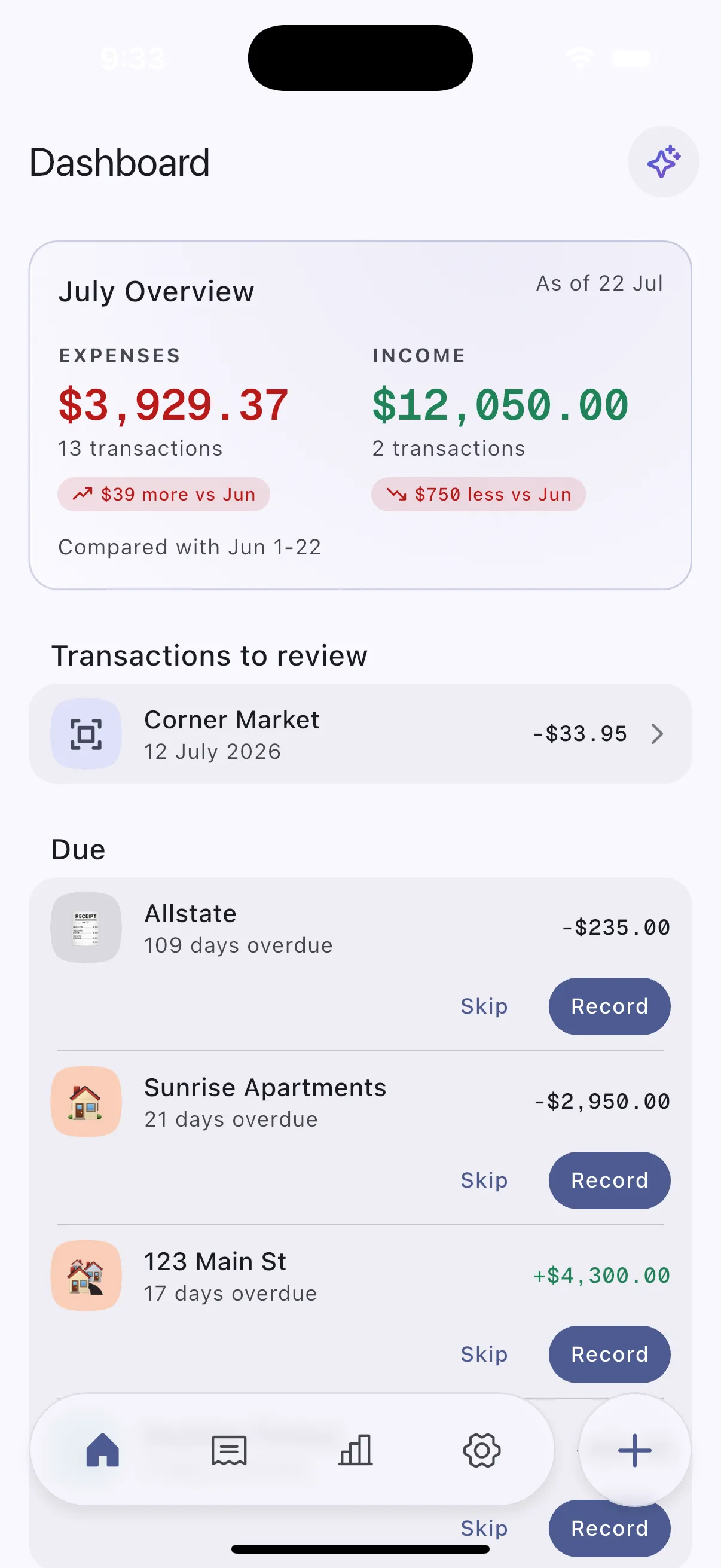
Five screens cover most of what you will do: see the month, add something, check a scanned receipt, read the breakdown, and decide what runs on your device.
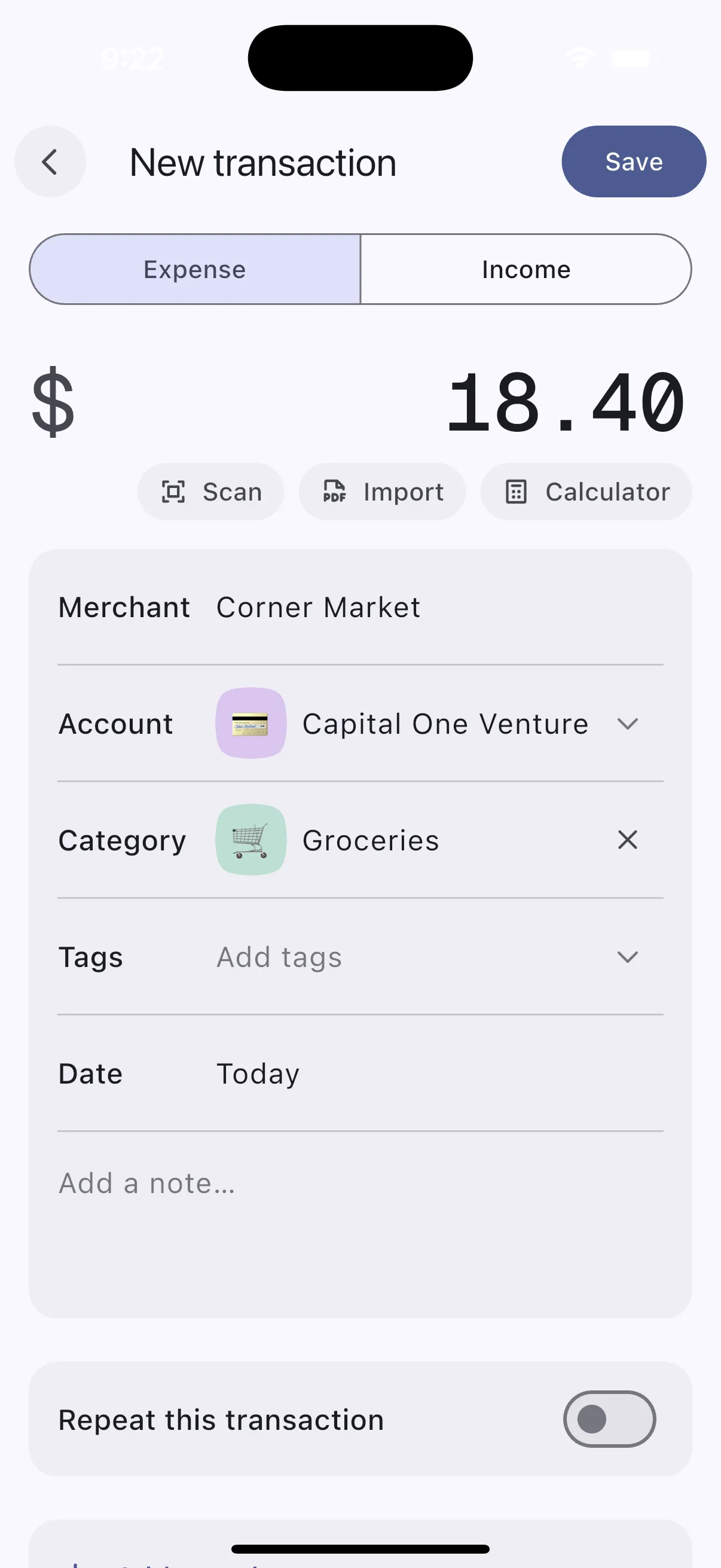
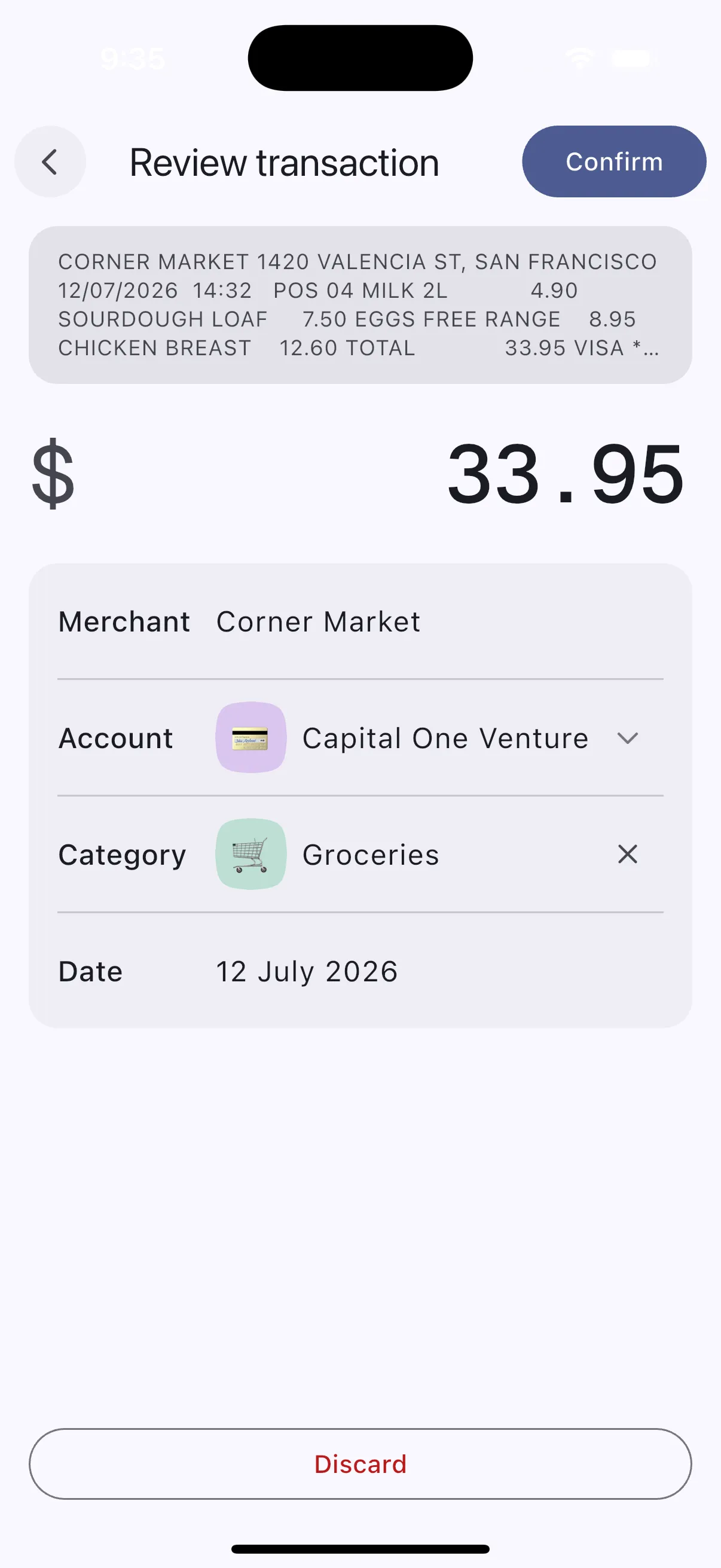
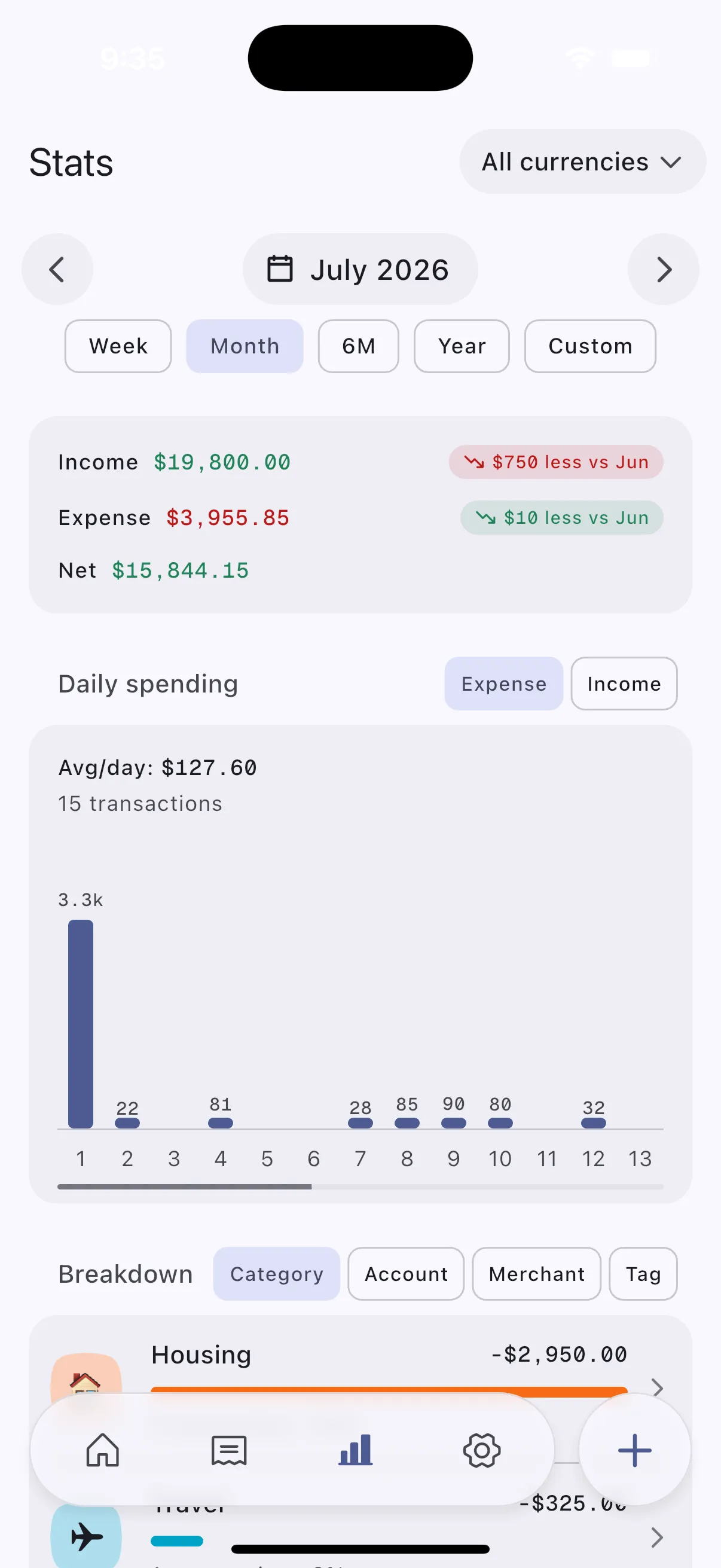
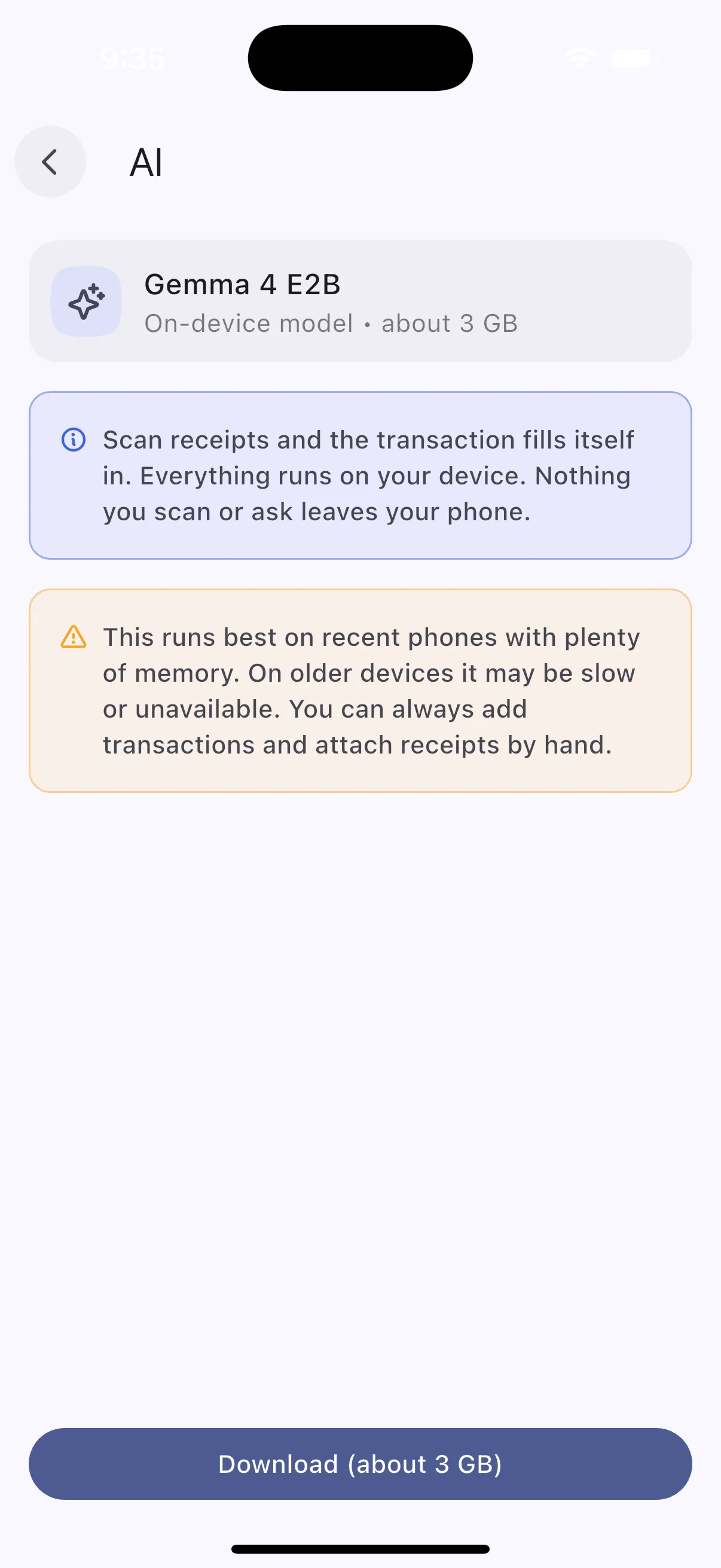
Screenshots from the iOS app, on sample data.
On-device processing
The software that reads your receipt is downloaded to your phone and works there, rather than sending the receipt somewhere else.
Scanning a receipt does two things. The app reads the text in the image. Then a small language model on your phone works out which parts of that text are the merchant, the total and the date, and suggests a category to match.
Running on the phone means it works in aeroplane mode and on a train with no signal. It also ties results to your hardware: a recent phone runs quicker than an old one, and some devices cannot run it at all.
Some features need the model downloaded first. The app shows the size before it starts, and you can delete the model later.
Extraction helps; it does not always get it right. Faded print, odd layouts and poor lighting all trip it up, which is why an unclear receipt waits for you instead of being recorded. Keeping the work local also leaves less reason to send financial details anywhere.
Optical character recognition converts the receipt image into raw text. That text is then passed to a compact language model running locally through the platform's on-device inference support, which returns structured fields - merchant, amount, date, currency, suggested category - rather than free text.
Model files are stored in the app's own storage and can be deleted from settings. Inference speed scales with available memory and the device's accelerator, so performance varies across the range of supported phones.
FAQ
What people ask before installing. The full list covers privacy, offline use, receipts, backups and purchases.
No. Install it and start tracking. There is no sign-up and no profile to fill in. Cloud backup, if you turn it on, uses your own iCloud or Google Drive account rather than an Expensed one.
On your device, in the app’s own storage. It stays there until you export it or turn on backup to your own cloud account.
No. Receipt images and the text read from them stay on your device. Cloud backup can include receipt attachments in the file it writes to your own storage account, and the app says so before you enable it.
Yes. Adding transactions, scanning receipts, browsing history and reading reports all work offline. A connection is needed only to install the app, download the on-device model, buy premium, or run a cloud backup.
No. Faded printing, odd layouts, handwriting, creases, poor lighting and uncommon languages all cause mistakes. When a reading does not settle - an unreadable total, an unclear merchant, something that is not a purchase - the receipt waits for you instead. Recorded transactions stay editable, so a wrong figure is a correction rather than a problem.
The work happens on your phone, so the model has to live there. It downloads once and runs locally after that. Shipping it inside the app would burden everyone who never scans a receipt.
Export the data yourself, or turn on backup to your own iCloud or Google Drive account. You start both deliberately; neither happens by default.
Almost all of it. Entry, receipt scanning, automatic logging, categories, accounts, tags, recurring rules, reports, search, CSV import and export, and backup to a file all cost nothing. Cloud backup is the one feature behind a purchase.
Record what you spend, scan a receipt when you have one, keep the details on your own device.
Feature availability can differ between iOS and Android, and between device models.